The Operating System for Modern Garment Development
From first moodboard to delivered order. Every spec, sample round and supplier conversation in one system.
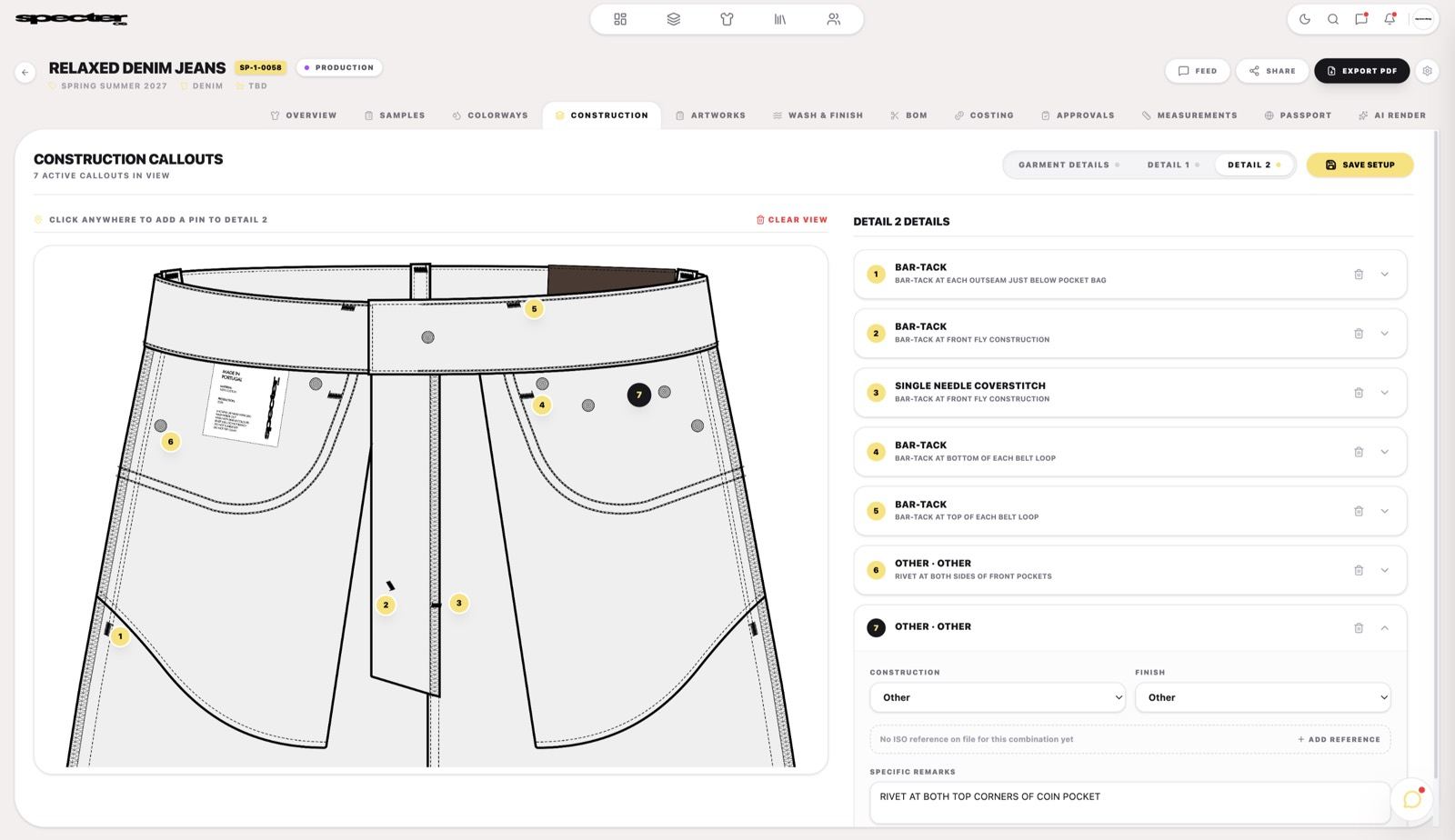
From spec to sample, without losing the thread.
Brands, factories and suppliers working on the same style, in the same place. No more spreadsheets and email chains. The same style record follows the garment the whole way. Nothing gets re-typed, re-exported or re-explained.
Build the point-of-measure table with grade rules and tolerances. Change a base measurement and the whole size run regrades — no copying a row across five columns and hoping.
Your factory opens the live style, not a PDF from three revisions ago. When they have a question, they raise it against the exact measurement in dispute.
Measured values land next to the spec automatically, so an out-of-tolerance point is obvious the moment the sample is logged — not after the bulk is cut.
Every style in the collection with its real status, so you know which one is holding up the drop before the ship date does the telling.
| Code | Point of measure | XS | S | M | L | XL | Tol |
|---|---|---|---|---|---|---|---|
| A | Chest, 2.5 cm below armhole | 46.0 | 49.0 | 52.0 | 55.0 | 58.0 | ±1.0 |
| B | Body length from HPS | 67.0 | 69.0 | 71.0 | 73.0 | 75.0 | ±1.0 |
| C | Shoulder seam to seam | 42.0 | 44.0 | 46.0 | 48.0 | 50.0 | ±0.5 |
| D | Sleeve length from shoulder | 19.5 | 20.5 | 21.5 | 22.5 | 23.5 | ±0.5 |
| E | Bottom hem opening | 46.0 | 49.0 | 52.0 | 55.0 | 58.0 | ±1.0 |
| F | Neck rib width | 2.0 | 2.0 | 2.0 | 2.0 | 2.0 | ±0.2 |
| Style | Description | Factory | Stage |
|---|---|---|---|
| SPC‑1042 | Heavyweight Tee | Fabrika Tekstil | In production |
| SPC‑1088 | Denim Jacket, washed | Konya Denim | TOP approved |
| SPC‑1104 | Cropped Hoodie | Fabrika Tekstil | PP in review |
| SPC‑1119 | Ribbed Tank | Not assigned | Spec draft |
Built for everyone who touches the style.
From the first flat to the signed-off top-of-production sample, and on to the factories and mills that make it. Everyone works in the same record, with no portal to learn and no pack to re-key.
Turn a flat into a spec’d tech pack without rebuilding it in a spreadsheet.
Pull a fit you’ve already proven out of the CAD library instead of starting from zero.
Keep Pantone TCX references, lab dips and print placements attached to the style.
Pass to product development with the intent intact, not summarised in an email.
Define the rule once and generate the full size run with tolerances applied.
Compare measured sample values against spec, round by round, in one view.
Track every trim, finding, label and polybag with supplier and consumption per line.
See what changed between Rev 03 and Rev 04 — and who asked for it.
Run every client brand from one workspace, cleanly separated.
Deliver tech packs under your own branding, not ours.
Carry proven blocks and BOM templates from one client to the next.
Give a client visibility into their styles without handing over the account.
Receive a full tech pack in one place, not a screenshot pasted into a chat.
Query the exact point of measure in dispute, with the spec value beside it.
Submit measured values straight into the fit report instead of a return email.
Always work from the approved revision. No PDF roulette.
Price from the real BOM line — composition, weight and consumption — not a description in an email.
Submit a dip against the Pantone reference it answers, and see the decision when it lands.
Your MOQs, lead times and certifications sit on the record, so you stop fielding requests you cannot take.
You see the styles you are quoting on. Nothing else in the brand’s collection.
Suppliers we have already visited, ready to work with.
We have spent years visiting factories and building partnerships, and those partners are now part of Specter OS. Start from any of the pre-loaded suppliers, or onboard your own.
Start free. Pay when production is real.
Per user, per month — every plan includes one seat and the tech pack builder. The CAD library runs on credits: Signature and Bespoke include a monthly allowance, Series pays per credit.
Try the platform. Build your first tech pack and browse the CAD library. No commitment.
- 1 active user
- 1 active collection
- 3 active styles
- Pay-per-credit access to CAD library
- Styles cannot be shared
- No factory communication
Run your production properly. Share with factories, collaborate with your team, and stay on top of every collection.
- Everything from Series
- 1 active user
- Unlimited factory seats
- 3 active collections
- Up to 25 styles
- 40 monthly credits
- Full team collaboration
- €40 Tech Pack service credit per month
For brands where production is a full-time operation. Unlimited scale, priority everything, your brand front and centre.
- Everything from Signature
- 1 active user
- Unlimited collections & styles
- Priority support
- 100 monthly credits
- Priority Tech Pack service
- Custom workspace and subdomain
- €100 Tech Pack service credit per month
The questions we get asked first.
How It Works & Features
Do I need to be a technical designer to use Specter OS?
Not at all. Specter OS is built to bridge the gap between creative vision and technical execution. Our pre-loaded professional CAD library gives you a head start — drag, drop, and customise factory-ready vectors without needing a fashion design degree or complex software skills.
Can I import my own designs from CLO3D?
Yes. Alongside our built-in library, you can upload your own vector assets and CLO3D files directly into your workspace.
Are my designs and IP secure?
Your workspace is completely private and your intellectual property remains solely yours. We never use your designs or uploads to train shared libraries or any external models.
Factory & Communication
Do I have to use factories from a directory, or can I bring my own?
Either. Specter OS comes pre-loaded with factories and mills we have visited and worked with ourselves, so you can start from a partner we can actually vouch for rather than a name scraped off a directory. Bringing your own works the same way: generate a private link to invite your existing factories into your workspace, where they can view tech packs, leave comments, and update sample statuses in real time.
Do my manufacturers have to pay to use Specter OS?
No. On our Signature and Bespoke plans, factory seats are unlimited and completely free for your suppliers. They can log in, view tech packs, and communicate with you without needing a paid account.
How does communication with factories work across languages?
You can set your language, currency, time, and date preferences within Specter OS. Because all communication is tied directly to visual CADs and specific garment measurements inside the platform, it significantly reduces the translation errors that come with using WhatsApp or WeChat.
Pricing & Account
How does the free plan actually work?
The free plan gives you access to our core tools and lets you create up to 3 styles — enough to properly test the platform with a real collection before committing to a paid plan. No credit card required.
Can I upgrade, downgrade, or cancel later?
Yes. You can manage your subscription directly from your dashboard at any time. We understand garment development has seasons, and your plan should flex with your workload.
I run an agency with multiple clients. Is Specter OS right for me?
Specter OS was built out of a production agency, so this use case is close to our hearts. Bespoke gives you advanced permission controls and custom branding on your exports and invoices, so your clients only see what you want them to see, under your brand. Every plan is priced per user per month, so you add seats for the team as you need them.


